
Be aware of the context window
Why Claude Code's auto-compaction quietly ruins long sessions, what context rot does to your results as the window fills up, and why the fix is awareness, not micro-managing every token.
The context window is the working memory of a coding agent, and the single most underrated reason why long Claude Code sessions drift, forget, and produce worse results over time. This post covers the two mechanisms behind it, auto-compaction and context rot, and the low-effort habits that avoid both.
Disclaimer: This was originally written on March 31, 2026. Things move fast. Depending on when you read it, some parts may already be outdated. Since we have a Claude company license and most of us use Claude Code, this is fairly specific to Claude Code. General concepts like context rot apply just as much to other harnesses and models (Codex, Opencode; GPT, GLM, Kimi).
TL;DR
- Keep an eye on the context window → statusline
- Try to avoid context compaction
- or be prepared for it → keep state session-external
- A 1M context window is no workaround for compaction in long sessions
- Context rot: past a certain fill level, results get significantly worse → stay in the sweet spot
- Keep the context window small → avoid MCPs, a big CLAUDE.md, big compaction results
- Don’t overengineer context management. Just be aware of it.
- Keep sessions small and short.
- Better to start a new session with a longer intro prompt than to stay in one long session.
What is context compaction?
Claude Code operates within a token context window. When the window fills up, Claude Code runs auto-compact: it summarizes the entire conversation history into a compressed form and continues from that summary. It basically keeps the session alive. For details on how Claude Code handles compaction, see the docs.
Unfortunately, in my experience Claude Code’s auto-compaction is bad (especially compared to Codex). After compaction it forgets which files were modified, a plan from plan mode, parts of the todo list… you basically lose the flow. Ever wondered why results get worse during long sessions? That’s one answer.
If you want to stay in a long session, you need to be aware of this and prepare accordingly. Use a session-external structure for planning (e.g. markdown files) that also tracks progress and survives compaction. In my experience, every time I hit compaction in a long-running session, the drift begins and strange behavior starts.
It’s extremely frustrating and unproductive when this happens in the middle of a task, leaving you in a kind of broken state.
Compaction is expensive
The auto-compaction itself eats token usage. It’s hard to measure exactly what drives the cost, but in my early Claude Code days I could clearly see a percentage jump after major compactions. In the end it re-processes your complete history to compact it, and that costs tokens.
On top of the compaction itself, the “where am I?” phase afterwards costs tokens too. The whole gap between “context full” and “next productive step” burns tokens while producing no output at all.
Compaction itself takes context
The result of the compaction gets added to the context, that’s the whole point of the concept. But be aware that this also increases your context usage from the start.
You can see it in this little illustration:
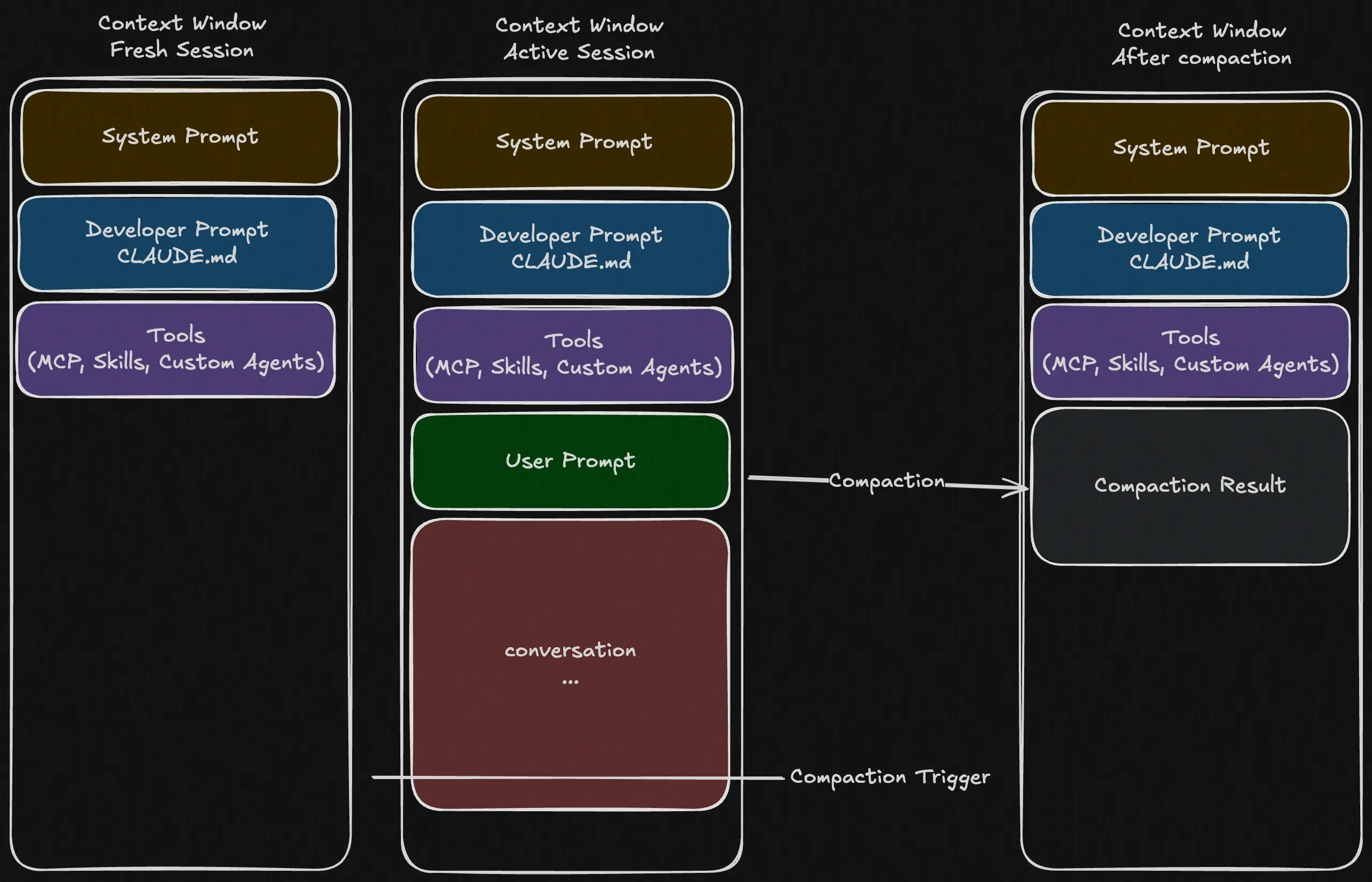
A session before, at, and after auto-compaction. Own illustration.
After compaction you won’t start from 0% (you never do :D), but with roughly 5% additional used context from the compaction result, depending on the session.
How to avoid auto-compaction
- Use more new sessions, or
/clear- Keep tasks short and scoped
- Personal tip: use a longer intro prompt that explains the rough context of the task: what’s already done, where we are, what’s next, a bit about the environment. Reuse this intro prompt and adjust it for each task.
/compactyourself when you’re in a “compact-safe” state, at logical breakpoints. You can also add a custom focus after the command to tell Claude what to prioritize in the summary.
Context window
This is a topic of its own and would be too much for this post, so I’m leaving out things like MCPs, skills, and subagents.
Before you continue reading: run the /context command in one of your active sessions. It shows exactly how your current session’s context is being used.
You’ve maybe seen or already used the 1M context variants of Opus and Sonnet. Seems like the logical solution to all these problems, right? Right? No!
There are use cases for such a large context, like working with lots of data or single big files (e.g. PDFs) that don’t fit into the normal window at all. But it’s not the solution for auto-compact.
Why? → Context rot.
One additional use case I can think of is avoiding auto-compaction. But then you really need to watch your context usage and manage it manually via /clear or /compact to not run into context rot.
Also good to know: the 1M variants burn through your usage faster beyond the 200k base window. If you’re already struggling with strict limits, avoid them.
What is context rot?
Context rot is a known problem where LLM results significantly worsen once the context fills past a certain level: the model gets measurably worse at using what’s in its window as the window grows.
Maybe you’ve experienced it: you’re in a session, and the results get worse with every prompt. Perhaps you’re in a yelling-loop (a phenomenon where the next most likely answer is wrong, so the user yells again, just like in the last three prompts), or you’ve hit context rot. This graph from Chroma’s context rot research illustrates it well. Newer models are improving here, but it’s still a problem.
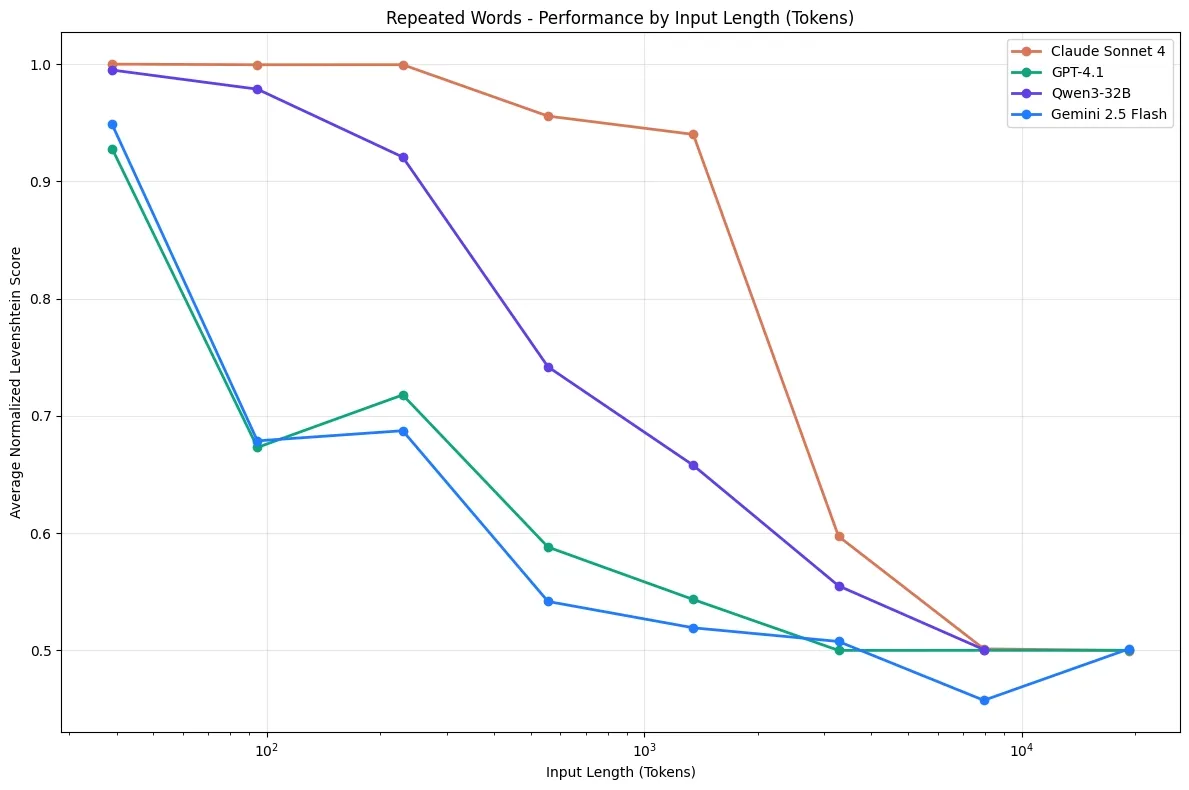
Model accuracy against input length on the “Repeated Words” benchmark. Source: Chroma, Context Rot.
Anthropic says Opus 4.6 has significant long-context improvements, but it’s still significantly worse at 1M than at 256k.
It’s hard to call exact numbers or pin down the tipping point for Opus or Sonnet, and I’m not aware of a published Claude-specific threshold. From my own sessions, the ~60% area is a working heuristic, not a measured number.
On the 256k variant, the compaction trigger sits around 85–95% of the context window in the sessions I’ve watched. That leaves enough buffer to wrap up a session and prepare for a new one, or for a compaction.
So if you want better results: try to stay in the sweet spot.
Micro context management
Context management is a whole topic in itself. You might now think you have to be extremely careful not to create too much context, avoid auto-compact at all costs, and so on, just to stay in the sweet spot.
No, it’s not worth the effort. That would only stop you from developing the right mindset for getting good results. Just avoid the big things: lots of MCPs, skills, or a huge CLAUDE.md. It’s setup optimization, not agonizing over context with every single input.
Being aware of the topic is enough.